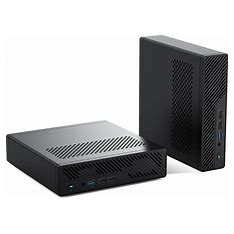



I ordered a barebones Minisforum MS-A1 to build my LLAMA3 server. I purchased it directly from the Minisforum store for $270.17 complete. I then purchased 96Gb of 5600 Mhz Crucial memory, AMD Ryzen 7 8700G processor and a 2Tb Samsung 990 Pro NVMe M.2 SSD. Total cost to me including the computer was $1,084.63, your milage may vary. Also, I received notices that the cpu and ram prices have dropped since I have purchaced them.
The MS-A1 came well packaged using DHL. The package contained two boxes. The first was the computer, power supply, HDMI cable and a tool to pull the computer out of the case. The second contained the cooling unit and some screws.. It made the build much easier as I did not have to remove it and reinstall the cooling unit.
The assembly was straight forward. I suppose it would be easier for you if I had made a youtube video of the process. The instructions were brief. I stumbled on not catching that I just needed to just remove the two screws on the bottom near the back/network side of the unit. It was a bit tricky to get the top cooling unit screw in, as it was deep within a well formed by the cooling unit and the motherboard. A magnetic screw driver helped with that.
Once I got it together and connected it fired right up. The unit started up in BIOS mode and the settings looked correct. I had a 2TB external SSD and flashed Ubuntu 24.01.1 server on it. I then proceeded to install Ubuntu on the MS-A1 without incident. The MS-A1 has been running without any load on it and the unit is cool to the touch and the fans are very quiet. I installed LLAMA3.1 on it already and will report on further progress as I proceed. I need to install some more software before I can proceed to connect it to my Visual Code editor on my Windows 11 pc.
The instructions for installing Ubuntu/Ollama are on their respective websites. I will try to document the entire process of installing Ubuntu and LLAMA3.1 on my MS-A1.
I have ordered a MINISFORUM DEG1 eGPU Dock to add a GPU I have in an older computer that I do not utilize. It has a great GPU/Graphics card installed in it. The dock will allow me to add the GPU card to my rig. My hope is to increase the performance of AI tools I have loaded up. I’m sure that the task I have will require magnitudes of better performance that my MS-A1 can provide, but it is a start.
Wow… Just received the docking station for the MS-A1 computer. It came via UPS and with very professionally packaged. I went online to lookup how to set it up. The dock requires a ATX power supply and Graphics card. I will cannibalize my old Window 10 computer and remove the power supply, graphics card and cables and connect it up. I will then try to figure out how to configure everything to use it to accelerate my on-site AI setup.
Leave a Reply